1. 개요
NVIDIA에서 발표한 FoundationStereo Model을 이용하여 윈도우즈 환경에서 실시간 스테레오 매칭을 테스트 해본다.
Astra Pro는 Depth 해상도가 많이 부족하여 형체 인식도 잘 안된다. 새로운 시도를 하여 보았고 결과는 만족스러웠다.
2. 스테레오 카메라 모듈
입력 이미지를 얻기 위해 아래와 같은 제품을 구매하였다. 가격은 4만원 조금 넘는다.
듀얼 렌즈 USB 웹캠 2560*720 30fps Windows Linux Android Raspberry Pi

3.라이브러리 설치
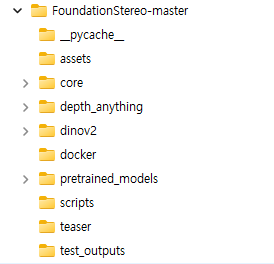
설치는 간단하다. Github에서 다운 받는다. 학습된 훈련 데이터(pretrained model)를 다운로드 받는다.
11-33-40/model_best_bp2.pth 또는 23-51-11/ model_best_bp2.pth
https://github.com/NVlabs/FoundationStereo
4. 테스트 코드 작성
scripts/test.py 파일을 다음과 같이 작성한다.
import os,sys
import argparse
import imageio
import torch
import logging
import cv2
import numpy as np
import open3d as o3d
code_dir = os.path.dirname(os.path.realpath(__file__))
sys.path.append(f'{code_dir}/../')
from omegaconf import OmegaConf
from core.utils.utils import InputPadder
from Utils import set_logging_format, set_seed, vis_disparity, depth2xyzmap, toOpen3dCloud
from core.foundation_stereo import FoundationStereo

# 경로 설정
code_dir = os.path.dirname(os.path.realpath(__file__))
sys.path.append(f'{code_dir}/../')

from core.utils.utils import InputPadder
from Utils import set_logging_format, set_seed, vis_disparity
from core.foundation_stereo import FoundationStereo


def run_realtime_stereo(args, model):
    # 웹캠 연결 (0번 카메라)
    cap = cv2.VideoCapture(0)

    # 웹캠 해상도 설정 (카메라가 지원하는 최대 SBS 해상도로 설정 가능)
    # cap.set(cv2.CAP_PROP_FRAME_WIDTH, 1280)
    # cap.set(cv2.CAP_PROP_FRAME_HEIGHT, 480)

    if not cap.isOpened():
        logging.error("웹캠을 열 수 없습니다.")
        return

    logging.info("실시간 스테레오 시작 (종료하려면 'q'를 누르세요)")

    with torch.no_grad():  # 추론 시 그래디언트 계산 비활성화
        while True:
            ret, frame = cap.read()
            if not ret:
                break

            # 1. SBS 영상 분리 (가로 절반)
            h, w, _ = frame.shape
            half_w = w // 2
            left_cv = frame[:, :half_w]
            right_cv = frame[:, half_w:]

            # 2. 전처리 (BGR -> RGB 변환 및 Scale 조정)
            img0 = cv2.cvtColor(left_cv, cv2.COLOR_BGR2RGB)
            img1 = cv2.cvtColor(right_cv, cv2.COLOR_BGR2RGB)

            if args.scale < 1:
                img0 = cv2.resize(img0, None, fx=args.scale, fy=args.scale)
                img1 = cv2.resize(img1, None, fx=args.scale, fy=args.scale)

            H, W = img0.shape[:2]
            img0_ori = img0.copy()

            # 3. 텐서 변환 및 패딩
            img0 = torch.as_tensor(img0).cuda().float()[None].permute(0, 3, 1, 2)
            img1 = torch.as_tensor(img1).cuda().float()[None].permute(0, 3, 1, 2)

            padder = InputPadder(img0.shape, divis_by=32)
            img0, img1 = padder.pad(img0, img1)

            # 4. 모델 추론 (Mixed Precision 사용)
            with torch.amp.autocast('cuda', enabled=True):
                disp = model.forward(img0, img1, iters=args.valid_iters, test_mode=True)

            # 5. 결과 후처리
            disp = padder.unpad(disp.float())
            disp = disp.data.cpu().numpy().reshape(H, W)

            # 시차(Disparity) 맵 시각화
            vis_disp = vis_disparity(disp)  # 유틸리티 함수 사용

            # 6. 화면 출력 (왼쪽 원본 + 시차 맵 합치기)
            # vis_disp는 RGB이므로 다시 BGR로 바꿔서 원본 cv 이미지와 합침
            vis_disp_bgr = cv2.cvtColor(vis_disp, cv2.COLOR_RGB2BGR)

            # 크기 맞추기 (scale 조절된 경우 원본 크기로 복구하여 합침)
            left_show = cv2.resize(left_cv, (W, H))
            combined_view = np.hstack([left_show, vis_disp_bgr])

            cv2.imshow('FoundationStereo Real-time (Press Q to quit)', combined_view)

            if cv2.waitKey(1) & 0xFF == ord('q'):
                break

    cap.release()
    cv2.destroyAllWindows()


if __name__ == "__main__":
    # 기본 설정값 구성
    parser = argparse.ArgumentParser()
    parser.add_argument('--ckpt_dir', default='../pretrained_models/11-33-40/model_best_bp2.pth', type=str)
    parser.add_argument('--scale', default=0.5, type=float, help='실시간 성능을 위해 0.5 권장')
    parser.add_argument('--valid_iters', type=int, default=8, help='실시간을 위해 반복 횟수 줄임 (기본 32)')
    parser.add_argument('--hiera', default=0, type=int)

    # 임시 args 생성하여 cfg 로드
    temp_args = parser.parse_known_args()[0]

    set_logging_format()
    set_seed(0)
    torch.autograd.set_grad_enabled(False)

    # 설정 파일 로드 및 병합
    ckpt_path = temp_args.ckpt_dir
    cfg = OmegaConf.load(f'{os.path.dirname(ckpt_path)}/cfg.yaml')
    for k in temp_args.__dict__:
        cfg[k] = temp_args.__dict__[k]
    args = OmegaConf.create(cfg)

    # 모델 초기화
    logging.info(f"모델 로딩 중: {ckpt_path}")
    model = FoundationStereo(args)
    ckpt = torch.load(ckpt_path, weights_only=False, map_location='cuda')
    model.load_state_dict(ckpt['model'])
    model.cuda()
    model.eval()

    # 실시간 루프 실행
    run_realtime_stereo(args, model)
5. 실행결과
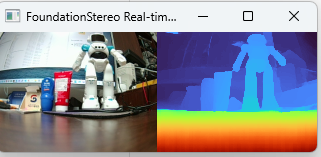
스테레오 매칭 결과가 실시간으로 잘 수행된다. 실제 응용에도 잘 적용될 수 있을 것이다.
반응형