1. 개요
VILA(Vision Language Model)는 NVIDIA와 MIT가 공동으로 개발한 최첨단 시각 언어 모델이다. 텍스트뿐만 아니라 이미지와 비디오를 동시에 이해하고 추론할 수 있는 멀티모달(Multi-modal) AI입니다. 기존의 많은 시각 언어 모델들이 단일 이미지 처리나 단순한 이미지 캡셔닝에 머물렀던 반면, VILA는 다음과 같은 강력한 차별점을 가진다.
- 멀티 이미지 및 비디오 추론: 여러 장의 이미지를 동시에 분석하여 관계를 추론하거나, 비디오 프레임을 이해하고 요약할 수 있습니다.
- 인컨텍스트 러닝(In-context Learning): 모델을 별도로 미세 조정(Fine-tuning)하지 않아도, 프롬프트에 몇 가지 예시를 함께 주면 그 패턴을 학습하여 정확한 답변을 생성하는 능력이 뛰어납니다.
- 디바이스 최적화: 대규모 데이터센터뿐만 아니라, PC 노트북 또는 NVIDIA Jetson Orin 같은 엣지 디바이스에서도 실시간으로 구동될 수 있도록 4-bit AWQ 양자화(Quantization) 등 효율성 최적화가 잘 되어 있습니다.
2. 설치
NVIDIA GPU가 장착된 환경에서 설치한다. NVIDIA GPU (VRAM 용량에 따라 구동할 수 있는 모델 사이즈(3B, 8B, 13B, 40B 등)가 달라진다. 소프트웨어: CUDA Toolkit, Python (주로 3.10 이상 권장), PyTorch
git clone https://github.com/NVlabs/VILA.git
cd VILA
# 스크립트에 실행 권한 부여 후 실행
chmod +x environment_setup.sh
./environment_setup.sh vila

conda config --set auto_activate_base false
conda activate vila
pip show vila
3. 사용하기
현재 PC 사양을 고려하여 NVILA-Lite-2B 모델을 이용한다.
vila-infer \
    --model-path Efficient-Large-Model/NVILA-Lite-2B \
    --conv-mode auto \
    --text "Please describe the image" \
    --media deer.png
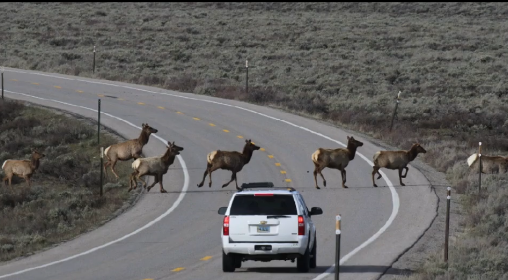
출력결과:
The image depicts a scene on a winding road surrounded by a grassy, hilly landscape. The road is a two-lane highway with a white line dividing the lanes and a yellow center line. There are four deer crossing the road from left to right, following the curve of the road. The deer are of varying sizes, suggesting a mix of adult and younger animals. They are all brown with some white markings on their faces and legs.
In the foreground, there is a white SUV with its headlights on, driving towards the camera. The SUV is positioned on the right side of the road, following the curve of the road. The vehicle's headlights are on, illuminating the path ahead.
The surrounding environment is lush and green, with patches of grass and shrubs lining the road. The sky is overcast, giving the scene a muted, grayish tone. The overall atmosphere is calm and serene, with the deer and the SUV coexisting peacefully in this natural setting.
This image captures a moment of wildlife crossing a roadway, highlighting the importance of wildlife crossings and the need for drivers to be cautious and patient when approaching such areas. The presence of the SUV suggests that this is a managed or controlled environment, possibly a wildlife corridor or a protected area where wildlife can safely cross roads without danger.
4. Running VILA API server
# terminal #1
conda config --set auto_activate_base false
conda activate vila
python -W ignore server.py \
     --port 8000 \
     --model-path Efficient-Large-Model/NVILA-Lite-2B \
     --conv-mode llama_3

# terminal #2
conda config --set auto_activate_base false
conda activate vila
python test_client.py
test_client.py 파일은 아래와 같이 작성한다. 로컬 환경(내 PC)에서 구동되고 있는 VILA 서버에 이미지를 보내고, 그 이미지에 대한 설명을 받아오는 클라이언트 코드이다.
# python test_client.py
#  try http://localhost:8000/docs
import requests
import base64
url = "http://localhost:8000/chat/completions"
headers = {"Content-Type": "application/json"}
# 1. 로컬 이미지 파일을 읽어서 Base64 문자열로 인코딩
image_path = "deer.png"
image_path = "test.jpg"
image_path = "test2.jpg"
with open(image_path, "rb") as image_file:
    base64_image = base64.b64encode(image_file.read()).decode("utf-8")

payload = {
  "model": "NVILA-Lite-2B",
  "messages": [
    {
      "role": "user",
      # VILA 최신 규격은 OpenAI 스타일에 맞춰 content를 리스트로 주거나,
      # data:image 키워드를 해석할 수 있도록 작성됩니다.
      "content": [
          {"type": "text", "text": "Describe this image in detail."},
          {"type": "image_url", "image_url": {"url": f"data:image/png;base64,{base64_image}"}}
      ]
    }
  ],
  "max_tokens": 512,
  "top_p": 0.9,
  "temperature": 0.2,
  "stream": False,
  "use_cache": True,
  "num_beams": 1
}

try:
    response = requests.post(url, json=payload, headers=headers)
    print("--- VILA의 답변 ---")
    res_json = response.json()
    if 'choices' in res_json:
        print(res_json['choices'][0]['message']['content'])
    else:
        print(res_json)
except Exception as e:
    print("에러 발생:", e)
5. 채팅 프로그램 만들기
# DialogText.py
# python DialogText.py
import sys
import io
import requests
import json

# 우분투 환경에서 한글 깨짐 및 디코딩 에러를 원천 차단
sys.stdin = io.TextIOWrapper(sys.stdin.buffer, encoding='utf-8')
sys.stdout = io.TextIOWrapper(sys.stdout.buffer, encoding='utf-8')

# 로컬 VILA 서버 주소 및 헤더 설정
url = "http://127.0.0.1:8000/chat/completions"
headers = {"Content-Type": "application/json"}

# 대화 기록 보관 배열
conversation_history = []

# 모델에게 부여할 첫 지침
system_instruction = "당신은 유능한 로봇 공학 및 3D 시뮬레이션 인공지능 비서입니다. 답변은 친절하게 한국어로 해주세요.\n\n"

print("==================================================")
print(" 로컬 VILA 텍스트 대화 프로그램이 시작되었습니다.")
print(" 종료하려면 'quit' 또는 '종료'를 입력하세요.")
print("==================================================")

while True:
    try:
        # [나]: 대기 및 입력 받기
        user_input = input("\n[나]: ")
    except UnicodeDecodeError:
        # 혹시나 터미널 잔여 버퍼로 인해 에러가 나면 한 번 더 안전하게 처리
        print("\n[시스템]: 입력 인코딩에 일시적 문제가 있어 다시 시도합니다.")
        continue

    if user_input.strip().lower() in ['quit', 'exit', '종료', 'q']:
        print("대화를 종료합니다. 감사합니다!")
        break

    if not user_input.strip():
        continue

    # 첫 대화일 때만 시스템 지침 결합
    if len(conversation_history) == 0:
        full_content = system_instruction + user_input
    else:
        full_content = user_input

    # 사용자의 질문을 기록에 추가
    conversation_history.append({
        "role": "user",
        "content": full_content
    })

    payload = {
        "model": "NVILA-Lite-2B",
        "messages": conversation_history,
        "max_tokens": 512,
        "top_p": 0.9,
        "temperature": 0.5,
        "stream": False,
        "use_cache": True,
        "num_beams": 1
    }

    try:
        response = requests.post(url, json=payload, headers=headers)
        res_json = response.json()

        if 'choices' in res_json:
            raw_response = res_json['choices'][0]['message']['content']

            # VILA 리스트 형태 답변 예외 처리
            if isinstance(raw_response, list):
                try:
                    model_response = raw_response[0]['text']
                except (IndexError, KeyError):
                    model_response = str(raw_response)
            else:
                model_response = str(raw_response)

            print(f"\n[VILA]: {model_response}")

            conversation_history.append({
                "role": "assistant",
                "content": model_response
            })
        else:
            print("\n[에러 발생 반환값]:", res_json)
            conversation_history.pop()

    except Exception as e:
        print("\n통신 또는 데이터 처리 에러 발생:", e)
        if conversation_history and conversation_history[-1]["role"] == "user":
            conversation_history.pop()